A pricing job that was nearly a full-time role, down to an hour or two
A US food distributor rebuilt customer pricing sheets by hand from two suppliers' cost files, in whichever layout each customer expected. An Excel engine with Power Query imports and a one-click VBA refresh now does it in an hour or two.
The problem
A US food distributor priced its customers from two suppliers’ cost files. Every cycle, someone took those files, worked out the new prices for each customer against the right margins, and rebuilt the pricing sheets by hand. Not one sheet, either: different customers expected different layouts, so the same numbers had to be laid out several ways.
It was close to a full-time job for one person, and an expensive one. The shape of the supplier data varied a great deal from file to file, and getting from cost to customer price relied on a considerable number of conditions that all had to be applied correctly, every time, by hand. People are good at many things, but repeating the same hundred small decisions without slipping once is not one of them.
What I built
One engine, not one spreadsheet per customer
A central pricing engine workbook in Excel. Power Query connections pull the supplier cost files in (one supplier with separate warehousing and non-warehousing feeds, one with a combined layout), and master tables hold the items, the customers and the margins that apply to each. Pricing is worked out once, from those tables, rather than re-keyed into every sheet.
Two templates, signed off before rollout
Customers expected their pricing in one of two layouts, so I built two standardised templates, one per layout, designed to a clean professional standard. I mocked both up and had them signed off before anything was built on them: changing a template after it’s wired to a live engine is the expensive way round. Four customers moved onto the new templates in this first phase.
The one-click refresh
Each quarter the refresh does the whole job: imports the new supplier costs, recalculates every customer’s pricing, and rewrites every output sheet in its layout. The VBA behind it is where the variety lives. It has to cope with supplier data that changes shape and with customer formats that differ, so it carries the conditionals a person used to hold in their head, and applies them the same way every time.
Keeping last quarter alongside this one
Customers want to see what they paid last quarter next to what they’ll pay now. That comparison is preserved automatically through every refresh, so the sheets keep showing prior pricing beside new pricing without anyone copying the old column across first.
A front page that says whether to trust the numbers
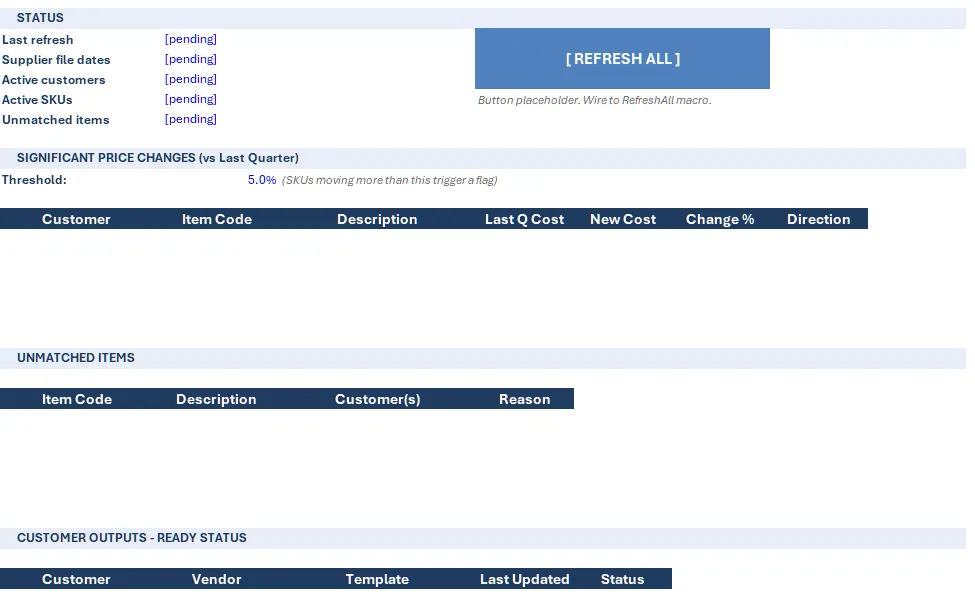
The dashboard sheet shows the date of the last refresh, SKU counts, anything that didn’t match between the supplier files and the item master, and any price that moved by more than a configurable threshold. Unmatched items and big jumps are exactly the things that used to slip through; now they’re the first thing on screen.
Handover, not dependency
A written guide covers the quarterly refresh, adding a customer, adding a SKU, and what to do when a supplier changes its file. The point of the build is that the business owns it. Two rounds of revisions were included on both the template design and the final build, and the whole thing went from kick-off to delivery in three weeks.
The result
The job that was close to a full-time role now takes an hour or two: collect the supplier files, plug them in, run the refresh. And it isn’t fallible the way a person doing the same thing for the hundredth time is; the conditions are applied identically every cycle.
Phase 1 covered the engine, the templates and four customers. Migrating the remaining customers, automated PDF export, branded styling, email automation and multi-quarter trend reporting were scoped out for a second phase.
Got a job that sounds like this?
Let's talk about what you need