One master workbook, 29 private copies, no more copy and paste
A mortgage brokerage paid 29 advisers from one Excel workbook, one tab each, and every Friday the office manager copied each adviser's figures into an email by hand. A Power Automate flow now gives every adviser a view-only copy of their own tab, kept up to date at the press of a button.
The problem
A mortgage brokerage manages weekly adviser payments in a single Excel workbook, one tab per adviser. Every week the office manager was copying each adviser’s figures into an email by hand. Twenty-nine advisers, most at other firms, every Friday.
The brief was simple: give each adviser a view-only copy of their own tab, kept up to date automatically, and change nothing about how the manager works.
What I built
The system never reads the data
The adviser tabs were not tidy data. No headers, layouts that drifted from tab to tab, side-by-side blocks, date headings typed as text. Anything that tried to read and reorganise the figures would have broken the first time a tab changed shape.
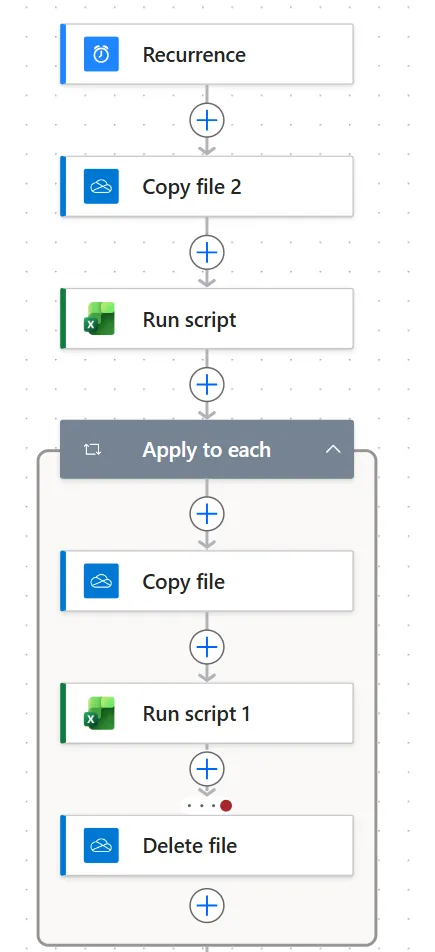
So the system never reads the data at all. When the manager presses Run, a Power Automate flow takes a copy of the master for each adviser, uses a short Office Script to delete every sheet except theirs, and writes the result into a workbook that only that adviser can open. Formatting, layout and notes arrive exactly as they were entered. A settings table in the master controls who receives a sheet. Adding a new adviser is one row, one tab and one share. Anything not on the list, working tabs, imports, leavers, never leaves the file.
The interesting part
Excel Online and the Power Automate connectors have some quirks that only show up when you build something real:
- The Excel connector keeps a session on any file it touches for around six minutes. Copy that file too soon and the copy fails with a lock error. The flow is arranged so no script ever touches the master or an adviser’s file, and a short pause separates preparing the copies from delivering them.
- Copying over a shared file replaces it with a new file. The link every adviser was given stops working. Delivery uses a content update instead, so each adviser’s file and share link stay the same for good.
- If anything goes wrong preparing an adviser’s copy, the half-made file is deleted before delivery. Nobody can ever receive a file containing someone else’s data.
Set up in the client’s own Microsoft 365
All of it was tested against dummy data in my own environment first, then set up in the client’s own Microsoft 365 on a screen-share call, under their account. I hold no access to their systems and everything is owned by the client from day one.
The result
Friday banking finishes, the master is closed, one button is pressed. Fifteen minutes later every adviser has their current figures and the manager has sent no emails. New starters take two minutes to add. The whole thing runs on tools already included in a standard Microsoft 365 business subscription.
If you have a master spreadsheet and a list of people who each need to see only their part of it, this pattern fits. Get in touch and I will take a look at your file.
Got a job that sounds like this?
Let's talk about what you need